Back to Selected Work

Workflow Application Case Study

Nexus Mission Control

A full-stack operations dashboard built for teams that need live visibility, faster updates, and cleaner admin control in one system.

ReactViteNode.jsExpressMongoDBSSE
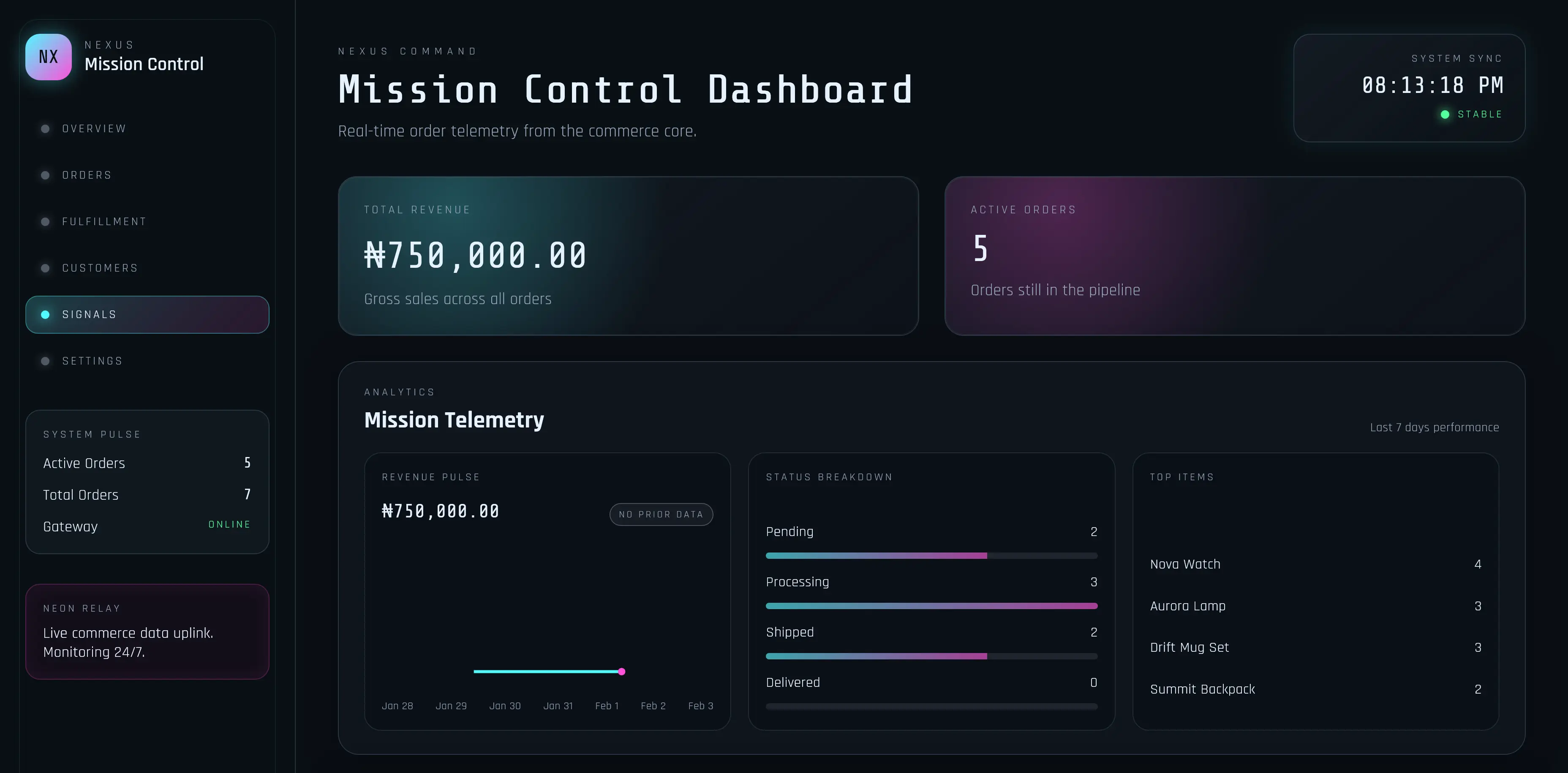
Nexus Mission Control dashboard preview

Workflow Shift

What improves when this system is in place

The strongest proof in an internal tool is usually operational: fewer missed updates, clearer visibility, and faster action paths for the people running the workflow every day.

Shared operational visibility

Before

Operators rely on scattered order checks, repeated refreshes, and slower status updates.

After

One shared dashboard for order visibility, updates, and summary tracking.

Safer team access

Before

Teams either overexpose admin actions or block too much access for read-only users.

After

Role-aware actions keep monitoring open while sensitive updates stay protected.

Faster update loop

Before

Order changes are easy to miss when the interface depends on manual reloads.

After

Live sync keeps the interface aware of new activity without manual refresh loops.

Operator Workflow

What the interface covers

  • Operations dashboard with sections for order flow, analytics, customer visibility, and settings.
  • Summary reporting for revenue, order volume, repeat rate, and active order tracking.
  • Order table, filters, pagination, and a faster order-composer flow for operator updates.
  • Role-aware login flow so admin and viewer access stay cleanly separated.

Implementation

What supports the workflow under the hood

  • Express API covering auth, orders, summaries, settings, and operational status endpoints.
  • MongoDB persistence through Mongoose for order records and reporting data.
  • Server-sent events stream for live sync status updates across the dashboard.
  • Protected mutations with role checks so write access stays admin-only.

Visual Evidence

Nexus Mission Control interface screenshot

One screenshot cannot show the full workflow, but it does make the operational density, navigation logic, and action-oriented layout visible immediately.

Operational hierarchy

The sidebar and summary cards show that the interface is organized around monitoring and action, not just passive reporting.

Action-ready layout

Table density, filters, and quick-glance metrics make the workflow feel built for active users rather than presentation-only dashboards.

System depth in the UI

The screen makes role-aware system depth visible quickly: navigation structure, status views, and operator controls are all part of the proof.

Semi-named team signal

"The dashboard made active work easier to read at a glance and reduced friction around tracking and updating live orders."

Observed after rollout

Shared visibility improved, live work felt easier to scan, and update actions became less scattered during active use.

Order dashboard and admin control

Product lead, internal operations team

Operations system rollout

Visible Proof

Backend surface visible in the shipped project

GET    /api/health
POST   /api/login
POST   /api/logout
GET    /api/orders
POST   /api/orders
PATCH  /api/orders/:id
GET    /api/orders/summary
GET    /api/orders/stream
GET    /api/settings
PATCH  /api/settings/auth

The Express server exposes auth-aware routes, connects to MongoDB, and supports both split deployment and serve-client delivery depending on how the system is shipped.

Decision Signals

Why this case study matters

Workflow-first UI

The interface is shaped around operator speed first, so tables, filters, summaries, and edit paths stay close to the core workflow.

Real-time trust

Live sync was included because operational tools lose value fast when users cannot trust what they are seeing in the moment.

Permission discipline

Role checks matter because internal tools need visibility and control at the same time, not one at the expense of the other.

This case study is shown here as proof of workflow depth, role control, and live operational thinking. The public site references the shipped system without forcing it into a demo format that would flatten how the real build works.

  • Client stack: React 18 + Vite
  • API stack: Node.js + Express
  • Database: MongoDB + Mongoose
  • Deployment options: single-server serve-client flow or split frontend/API setup

System Layers

The supporting layers behind the dashboard

Once the workflow proof is clear, these supporting layers explain why the system is usable in live operations instead of just looking like a polished admin screen.

Operations UI

Dashboard layout built around order flow, metrics, filters, and operator speed.

Live Sync

Server-sent events keep the interface aware of new activity and latest order changes.

Role Control

Admin and viewer roles gate write access while still supporting read-only monitoring.

MongoDB Model

Order data, summaries, and search filters are backed by MongoDB through Mongoose.

Next Step

Need an internal tool that improves live operations?

Start with the brief and describe the update bottleneck, access risk, or visibility gap. The reply will point you to the clearest next build path.